This free PNG to STL converter turns a flat image into a 3D-printable model right in your browser. Drop in a logo, a drawing or a photo, see it in 3D, set the size in millimetres and download a watertight STL that opens in any slicer. It works the same way for JPG, WebP and SVG files, so you can also use it as an image to STL converter for almost anything you want to print.
How to convert PNG to STL in 3 steps
- Upload your PNG. Drop a PNG, JPG or SVG onto the converter or click Choose image. The file is read by your browser and never uploaded.
- Pick a mode and size. Choose Heightmap, Extrude or Lithophane, set the width in millimetres, the relief height and the base thickness. The 3D preview updates live.
- Download the STL. Click Download STL and open the file in Bambu Studio, PrusaSlicer, OrcaSlicer or Cura. It is watertight and already sized in mm.
The whole process usually takes under a minute. Because nothing is uploaded, large images convert as fast as your computer can build the mesh.
Heightmap, extrude or lithophane: which mode should you use?
A PNG is only pixels, so every PNG to STL tool has to decide how to turn colour into height. Choosing the right mode matters more than any other setting.
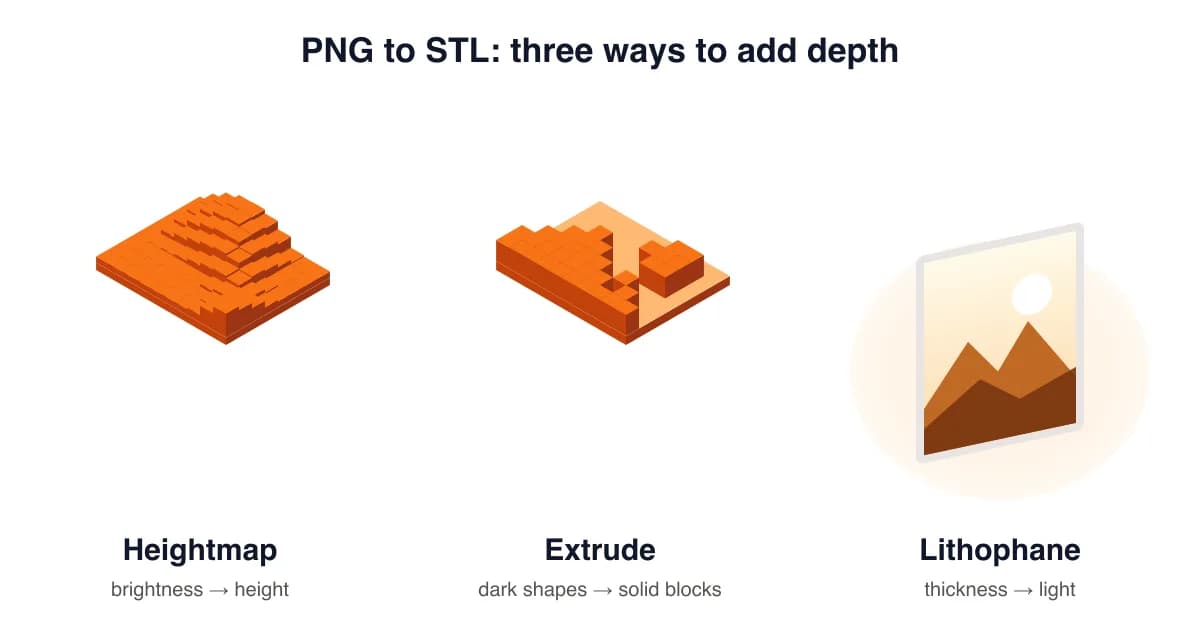
| Mode | How it works | Best for |
|---|---|---|
| Heightmap | White is high, black is low, greys are in between (Invert flips it). | Photos, reliefs, terrain, textures, coins |
| Extrude | Pixels darker than the threshold rise as solid blocks with vertical walls. | Logos, text, stamps, keychains, signs, cookie cutters |
| Lithophane | Dark areas print thick and block light; light areas print thin and glow. | Photo gifts, night lights, window hangers |
| SVG vector | Real vector outlines extruded with smooth curves instead of pixels. | Logos and icons you have as SVG |
Got a photo? Our JPG to STL converter guide has photo-specific tips, and the lithophane maker is tuned for backlit prints.
Best PNG to STL settings for 3D printing
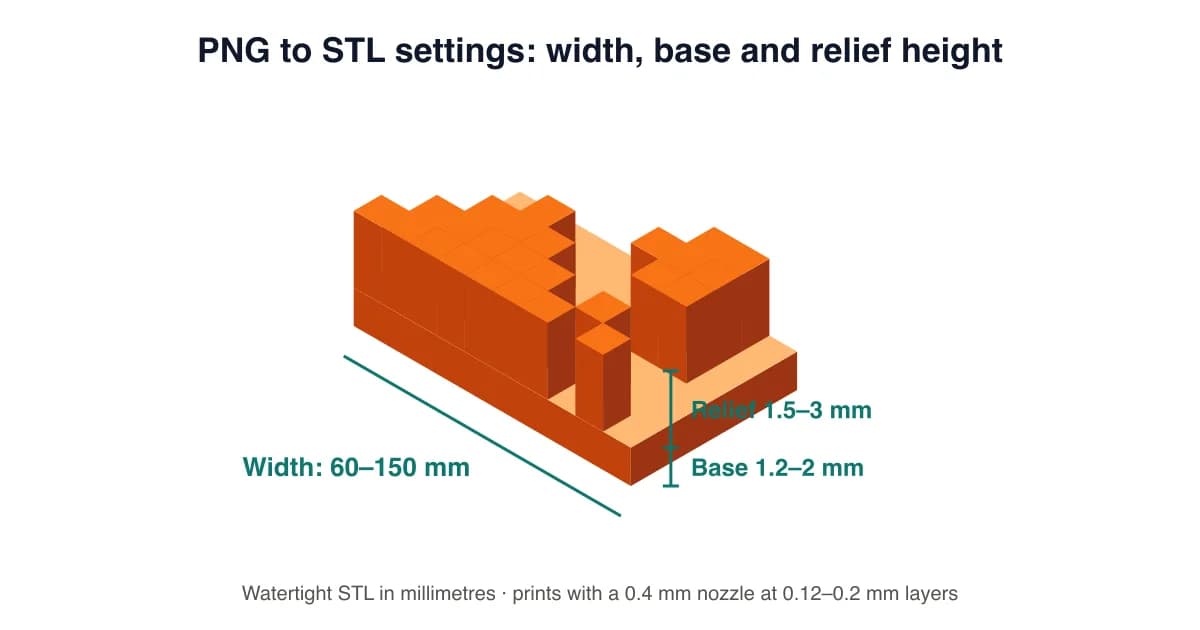
- Width: 60–100 mm for coasters and keychain tags, 100–200 mm for signs. Height follows the image's aspect ratio.
- Base: 1.2–2 mm keeps the model stiff and stops warping. Use 0 mm in Extrude mode for a cut-out shape without a plate.
- Relief height: 1.5–3 mm for logos and text; up to 5 mm for dramatic photo reliefs.
- Resolution: 200–400 px is plenty for most prints with a 0.4 mm nozzle. Higher values mostly make bigger files.
- Layer height: 0.12–0.16 mm captures fine relief detail; 0.2 mm is fine for bold logos.
Prepare your image for a clean STL
The best results come from high-contrast images. A few minutes of preparation saves a failed print:
- Use a transparent PNG or a plain background, then tick Remove background so only the subject is raised.
- For logos, increase contrast until the design is pure black on white, then use Extrude.
- For photos, crop tightly and boost contrast slightly. Faces work best lit from the front without harsh shadows.
- Thin lines under 0.8 mm at your print size won't print with a 0.4 mm nozzle, so make the model bigger or thicken the lines.
Common PNG to STL mistakes
- Raised background: the background is white, so heightmap mode lifts it. Fix: Remove background or Invert.
- Spiky, noisy surface: JPEG artefacts become bumps. Fix: add 1–2 steps of Smoothing.
- Huge file: resolution set to 1024 for a 50 mm keychain. Fix: 200–300 px is enough.
- Paper-thin model: no base. Fix: keep the base at 1.2 mm or more unless you need a cut-out.
Free PNG to STL vs Pro
The converter on this page is free forever, with no watermark and no daily limit, because it runs on your device and costs us almost nothing. Pro ($9.99/month or $59.99/year) adds what needs servers or extra engineering: AI photo to true 3D models, curved and lamp-shade lithophanes, name keychains, multicolour 3MF for Bambu AMS, batch conversion, 4096 px resolution and a commercial licence.
PNG to STL FAQ
How do I convert a PNG to STL for free?
Drop your PNG into the converter at the top of this page, choose Heightmap, Extrude or Lithophane, set the width in mm, and click Download STL. It's free, needs no account and adds no watermark.
Is it safe to convert my photos here?
Yes. The free converter runs entirely in your browser using WebGL and JavaScript. Your image is never uploaded to a server, so family photos and client logos stay on your device.
Why does my PNG to STL look like a flat block?
Heightmap mode turns brightness into height, so an image with a solid background becomes a solid slab. Tick Remove background, switch to Extrude for logos, or use Invert if the wrong areas are raised.
What's the difference between heightmap and extrude?
Heightmap creates smooth slopes from every shade of grey, which suits photos and textures. Extrude only raises pixels darker than a threshold to one flat height, which gives crisp walls for logos, text and keychains.
Can I convert a PNG into a full 3D model, not just a relief?
A PNG has no depth information, so free converters (including ours) create 2.5D reliefs. Turning a photo into a full sculpture needs an AI model; that's our Pro AI photo → 3D feature.
What size and thickness should I use for 3D printing?
For signs and plaques use 80–150 mm wide, a 1.2–2 mm base and 2–3 mm relief. For lithophanes use 0.8 mm minimum and 3 mm maximum thickness at 100–150 mm wide, printed upright with 100% infill.
Will the STL work in Bambu Studio, PrusaSlicer and Cura?
Yes. The file is a binary STL in millimetres with a closed, manifold mesh and a flat base, so it imports at the right size and slices without repairs.
Can I sell prints made from the STL?
You own your image and the STL generated from it. The free plan is for personal use; the Pro plan includes a commercial licence for selling prints and files, for example on Etsy.
Last updated . Written and test-printed by the PixelToSTL maker team on Bambu Lab A1 and Prusa MK4 printers.